
portfolio
BA Animation ~ Final Year Projects

01
Objectives
This year I hope to expand my software knowledge for purposes related to 3D animation, specifically previs. I want to be able to experiment with new animation programs and begin to build my own workflows while using them. This can range from my physical approach to getting on with the work in front of me to the use of plug-ins to speed up my work.
Since one of my objectives is to be a self employed independent artist, I would like to start experimenting with using Blender as an alternative to Maya since Blender is open-source and Maya is quite expensive.
However, I want to keep my options open in regards to finding employment within an animation studio/film company, as another one of my ambitions is to work as a previs artist for either children's TV or the games sector. Abandoning Maya now wouldn't be beneficial for me finding employment as a 3D animator in these fields, seeing as Maya still holds up as being the industry standard software for this discipline.
For these reasons I aim to produce one previs project in Blender and one in Maya. To accompany these projects, I have decided to generate a polished 180º turn to prove I am versed in animating characters for body mechanics since this has been my weakest practice since last year's Body Mechanics module.
02
Showreel


03
Development
Over this semester, I've been practicing my figure drawing to attempt to refine my ability to create compelling poses using line of action. As a 3D previs artist, this is a subtle requirement for a role with several animation studios, so I will continue to build my figure drawing skills as time goes on.

Psychological Horror Previs

Script
After coming up with several rough ideas for this previs task, I landed with two solid concepts to work with. Although both were solid, I ended up using my second idea as a basis for the plot points of the story, as this one stuck to the brief while the other did not. I also didn't waste too much time on the formatting of the script, of which most scriptwriters are expected to follow a set standard. This is because I am directing my own short film, essentially, so I only need to make it readable to myself.


Rigs
Jumping straight into this project, I decided to use a rig of a creepy bogey-man-esque character for the figure the character sees near the end of the script. However, it was once I began experimenting with this rig in Blender that I realised quickly I could be overcomplicating the work for myself. The rig had broken controls that weren't working and instead of finding a different rig to use, I glanced back at the brief and realised there's nothing detailing the character coming face to face with any entity/creature.
I also looked more into the 'psychological' aspect of the brief and realised that there could be more suspense driven from audio cues rather than visual ones. "Do I want the audience to feel scared or do I want to scare the audience?" is what I asked myself, and I came to the conclusion that a psychological horror hinges on the audience's feeling, rather than imposing an obvious visual cue that cuts suspension, which is conventional of supernatural horror. For these reasons, I decided to abandon the idea of the character encountering the figure and focus on how I could tell the same narrative without ever showing the threat. This meant that the ending to my script would have to be altered, which I feel isn't too hard to do.
After I'd experimented with the creepy figure rig, I decided I wanted to use a native Blender rig for the main character. I looked to Blender Studio for some easy-to-use Blender rigs and stumbled across Snow v2, which from the get-go had very manageable controls that were similar to rigs I'd used in Maya before. I was happy with the style of the character and was ready to start animating with it.

Storyboard
Seeing as I had not much time to generate my own storyboards for this task, I'd decided to use ChatGPT to generate a storyboard for me. I fed ChatGPT a screenshot of the rig I was intending to use (Snow v2), the script I'd written, some major story beats I'd updated since the script and some screenshots of the interior of the scene, and to my surprise it generated a really effective storyboard that allowed me to start visualising the story in my head. It needed a few tweaks, as some of the storyboard thumbnails were ordered incorrectly according to the story beats I'd provided it. This was easily fixed by pasting the storyboard image it gave me into MS Paint and reordering some of the frames until I was ready to start adapting it in 3D. As effective as ChatGPT was with generating this storyboard, in future I feel I should attempt to improve my own storyboarding skills as I believe it is important to understand these practices as a previs artist. Nevertheless, I am happy that ChatGPT was able to generate this for me, given the time crunch I am facing.

First Pass
Using the pre-production material I generated including the script I wrote and the AI storyboards, I was able to generate a first half blockout of my story.
As I am using Blender to produce this previs, I decided to keep my character's movements in stepped tangents, to keep everything tidy and less complex. Using stepped tangents, I kept the character in a T-pose to plot the location keyframes so that I could visualise where the character will be and later focus my time on poses. This has already been beneficial for the timing of my story and understanding what other story elements can and can't work within the parameters of the character's position.

Incorporating Research
While generating the blockout, I inserted a heavy focus on shot composition, camera techniques and lighting that I'd researched from other films and TV to reinforce the impact I was trying to instil on the audience.
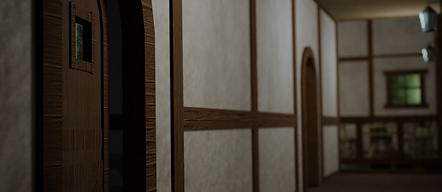
For example, in this shot, I wanted the character to rise from the dark and enter a well lit space. Using codes and conventions of psychological horror I figured that this would be great at building anticipation and suspense for the audience, as the audience would be subconsciously wondering why the danger would be coming from a more lit space instead of the dark. I had to pay attention to how I'd light the upstairs floor, however. Lighting that's too warm would sell the wrong impact and lighting that's too cold would oversell the right impact. In the end I went for a neutral white tone to sell the idea that there isn't something outright welcoming/deterring upstairs, rather there will be something that's unknown and worth exploring.
In this shot, I decided to keyframe a depth of field attribute on the camera to shift the focus onto the door that gets ignored by the character as he walks into the wrong room. I've done this deliberately to give the viewer some dramatic irony over the scene which will build suspense for every second they do not see the door again.
Car Chase Previs

Assets
As I want to steer this previs towards a stylised cartoon animation to keep my prospects of working within children's TV open, I decided to use a low-poly car rig pack I found on CGTrader. After successfully experimenting with the rig controls in Maya, I was comfortable to start animating these cars.


To give the idea that the cars are chasing one another through a city, I decided to import five building assets from the KitBash library using Cargo. With these assets, I copied and pasted them numerous times along the side of the road, ensuring that the framing of any of my shots doesn't give away that the buildings are indeed copied and pasted.
On a side note, I kept my film and resolution gates blue to create a translucent contrast between what's in the shot and what isn't, as I had difficulty with framing with just the grey film + res gates.
180° Turn Body Mechanics

Reference
Starting off my 180° turn for the Body Mechanics task, I decided to shoot a series of reference videos. During the first batch of reference videos, a thought came to me: what reason will my character have to turn around? I decided to incorporate a narrative element to this task to provide context for the turn. A bog-standard, vanilla turn didn't appeal to me, so I decided to shoot this reference video of me throwing an imaginary grenade, then turning away to brace for the explosion.

After re-evaluating my reference video, I was made aware of certain acting elements that needed addressing. In the original reference video, I thought, does someone throwing a grenade enter the action from a stiff upright pose, or is there lead up into the action? The motion of throwing the grenade also read more like I was throwing a tennis ball. With the initial reference video, I was happy with the turn itself and the action of dropping to a crouch for the brace, however, the other elements had to be rectified. These notes helped me to come up with newer, more readable reference material for the 180° turn.

Blockout
Starting off my 180° turn for the Body Mechanics task, I decided to shoot a series of reference videos. During the first batch of reference videos, a thought came to me: what reason will my character have to turn around? I decided to incorporate a narrative element to this task to provide context for the turn. A bog-standard, vanilla turn didn't appeal to me, so I decided to shoot this reference video of me throwing an imaginary grenade, then turning away to brace for the explosion.
04
Industry
Events
RAINBOW CONFERENCE 2025
(19th September)
I attended this event late, however, I was able to tune in to hear a few interesting discussions about productions that had been made, such as, 'The Amateur' and 'Nosferatu'.
I was interested in the production team behind The Amateur as they revealed a lot of their own in-house pipelines. For example, their graphics team and compositing team had efficient communication between each other which streamlined the production.
I was also interested in the studio behind Nosferatu, as they were being very technical and thorough in their breakdown of VFX shots and their use of lighting. For example, they used what they called a 'scotopic filter' for which its primary function is to emulate scotopic vision, which is how human eyes perceive light at low levels. They also spoke about using LiDAR to reference their scenes.
IN MOTION LONDON 2025
(9th+10th October)
Framestore (9th October):
I tuned in to listen to Kane Garcia, an animation supervisor at Framestore. He came to In Motion to give a talk about his involvement on the recent live-action remake of How To Train Your Dragon.
Garcia revealed that the project involved over 1100 artists, including 164 animators and 5 animating supervisors across four studios around the globe, collectively generating 101,422 shots over two and a half years.
He also emphasised how important it was for the studio to ground Toothless in reality as opposed to creating a unique creature. The studio looked at animals such as bats, panthers and lizards to get a feel for how Toothless should act. This went several steps further, with the studio creating a skeletal system and muscle structure based off the anatomy of bats to make sure the movements were believable. They integrated robotic gimbals and the use of puppeteers to sell the live-action elements alongside the CGI.
Other CGI creatures in media such as Buckbeak from the Harry Potter film franchise played a part in the inspiration behind Toothless's design.
To pre-plan the performance shots on set, Kane spoke about Framestore's virtual production tool, "Far Sight".
His team was responsible for digitally scanning real locations such as the Furrow Islands to act as a baseplate for the world the story takes place in.
Nexus Studios (10th October)
I attended the Nexus Studios panel for Immersive Storytelling. At the panel, I was lucky to hear from voices such as Chris O'Reilly, Deborah Caswell, Mike Anderson and Herman Diaz.
Chris started off the discussion by informing everyone he is the co-founder and chief creative officer of Nexus Studios. He went on to speak about how the company's involvement in developing immersive storytelling ranges from their contributions to places like The Sphere in Las Vegas and the Exosphere.
Deborah gave her take on spatial design and future trends. She claims that there is utmost importance of creating products that will shape storytelling in the future, beyond traditional "rectangular" formats.
She also boasted the release of the Bloom House Enhanced Cinema app and Headspace XR as examples of the company's innovation. Their goal is to create new means of experiencing cinema that are "untethered".
Mike shared his background as a painter and spoke about his involvement in traditional filmmaking, which helped him approach the Bloom House Project with a unique perspective.
He pitched a project that involved enhancing a classic horror film with new layers of spatial storytelling, using XR headsets to create a more immersive experience.
He also discussed the challenges of working within the periphery of the content they were using, respecting the filmmaker's intent with their idea and finding ways to compromise to enhance the story.
Deborah chimed in again to emphasise that creatives should consider the story as a first priority and then choosing the best medium to tell it.
Feedback
Since my struggle to comprehend body mechanics was dawning on me this year, I decided to seek feedback on my 180º turn from Ollie Trotman – a senior level animator at Sumo Digital.
My initial stance with the 180º turn task was that I wanted to generate realism. Having started the blockout and begun splining on my own, I was having difficulty getting the animation to flow properly, according to the 12 key principles.
It was when I spoke with Ollie that things began to make sense in my head. Communicating via an in-person tutorial and MS Teams messages with the use of Syncsketch to compile his notes, Ollie gave me incredible insight into how I should be approaching the task as he mentioned that my animation had a "distinct flavour".
Without steering too far from this flavour, Ollie gave me valuable feedback on how I could blend the realism aspects I'd achieved with my reference footage with more accentuated body movements. To me, this made perfect sense: if I was having trouble getting it to look realistic, then perhaps I should try blending some stylised motion with it.
Ollie also gave me tips on how I could make the sequence more readable. After our first discussion, my playblasts didn't feature the grenade being thrown yet. After watching my work in progress, he suggested I add it in sooner rather than later – not just for readability but for timing and weight distribution in the arm. Later, he recommended I add some camera shake when the explosion happens, to pair narratively with the slight wobble my character has near the end of the sequence.
Engagement
Laura N-Tamara
(21st October 2025)
Laura spoke about her early days in the industry as an intern with "one job" - to design backgrounds for episodic TV series.
She then spoke about how she went on to work at a creative agency where she created commercials and content for brands in web + paint. It was here that she learnt her most valued skill - multitasking.
I was intrigued by her methodology of inserting herself into the industry so I asked her "How did you find work at the creative agency that had you focusing on brand work?" to which she replied "I found a French internship website and applied for that role. I had a meeting, showed off my CV and eventually landed the internship."
Laura recommended us to look into online resources and communities such as motionhatch, festivus, London Animation Club, She Drew That, The Good Ship Illustration, and AOI.
Motion Capture Workshop - Grace Films
(22nd October 2025)
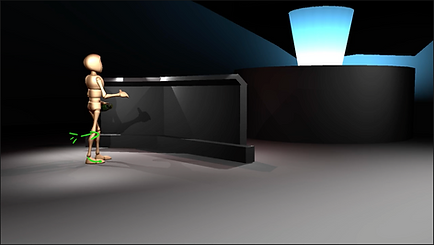
I was lucky enough to get involved in a Motion Capture Workshop for a film studio being outsourced for the development of a video game. I got to see first-hand the production expectations from the voice acting director and the technical processes involved.



05
Production Pitch
Attached is a PDF of the slides I used in my presentation on the 4th December, detailing my work breakdowns and my Production idea for my final semester.
06
Evaluation
Overall this semester, I feel as though the ideation stage of my development has been the weakest link for me. Due to time constraints over the 12 weeks allocated, such as the hardware limitations I faced with my home computer I found it difficult to spend time working on the development aspect of my projects. If I had made sure to utilise university computers sooner, I could have spent more time experimenting with software and new tools.
I also could have spent more time looking into filmic language from movies and TV shows that were relevant to the projects I was working on to acquire a better palette with cinematography. I tended to overlook creative works that had already achieved what I was trying to make and as a result this hindered my ability to ideate quicker.
Hardware limitations were a massive factor in my performance this semester as aforementioned, with my computer packing in during the middle of the semester which led to me losing time on my projects. In future, should these issues arise again, I will be looking into alternative methods of animating, such as using a Cloud PC.
I also think the time I spent working on my Body Mechanics and Previs tasks was unbalanced. I don't think I spent too much time on the Body Mechanics task, as this allowed me to deliver a product I'm proud of - considering this was my weakest skill as an animator prior to this semester. However, I do think that the time I spent on the tasks relative to my desired role in the industry was quite neglectful. If I had balanced my time across my body mechanics task and both previs projects, I feel I would have been able to generate lighting passes that would have incorporated the research I'd conducted into light and colour theory.
I am very pleased with the knowledge I've gained from visiting industry events, as this has given me more insight into the sector I aspire to find work in. On top of this, seeing first-hand the breakdowns of different production processes from industry has helped me narrow down my career path as an animator. Hearing about new trends with immersive storytelling and debates around the use of AI has made me a more competent artist as I'm now aware of what the industry is looking for. I am also very pleased with my industry engagement this semester as this has enabled me to start stepping outside of my comfort zone and to start sharing my ideas with others. I hope next year I keep up the pace and engage myself more with industry events, networking opportunities and receiving more feedback on my work
On the plus side, I am amazed I was able to jump head first into using Blender and cope with the challenges that brought me. Learning to use different editors within Blender helped me identify what I could be capable of producing in either software. As well, finding tools and add-ons in Blender drastically helped me cut down the time I was spending to learn the software, a methodology I am proud to have adopted and hope continues in future. I believe my experimentation with new software has made me more knowledgeable on animation pipelines and it's definitely improved my workflow.
